前言:
不用傳統執行緒,而用此是因為佔據主執行緒太久的時間,會當掉(系統設定)。
========
參考網站1有整理詳細,拿來記錄:
基本的架構AsyncTask<Params, Progress, Result>使用泛型來定義參數,
Params : 參數,你要餵什麼樣的參數給它。
Progress : 進度條,進度條的資料型態要用哪種
Result : 結果,你希望這個背景任務最後會有什麼樣的結果回傳給你。
此外,AsyncTask會有四個步驟。
onPreExecute : 執行前,一些基本設定可以在這邊做。
doInBackground : 執行中,在背景做任務。
onProgressUpdate : 執行中,當你呼叫publishProgress的時候會到這邊,可以告知使用者進度。
onPostExecute : 執行後,最後的結果會在這邊。
=======
很多人會犯一個問題,在dobackground 去對控件(元件)做些設定,比如:textview.setText("123");
這樣會出錯,因為doInBackground是在背景,必須回到UI Thread,也就是onPostExecute才能對UI做事情
透過以上讀取Web Server API範例
主程式
public class MainActivity extends AppCompatActivity {
    Button button;
    TextView mytest;
    @Override
    protected void onCreate(Bundle savedInstanceState) {
        super.onCreate(savedInstanceState);
        setContentView(R.layout.activity_main);
        mytest = (TextView) findViewById(R.id.mytext);
        button = (Button) findViewById(R.id.button);

        button.setOnClickListener(new View.OnClickListener() {
            @Override
            public void onClick(View view) {
                new GoodTask().execute(" http://.....自訂...");
            }
        });
    }

    class GoodTask extends AsyncTask<String, Integer, String> {
        // <傳入參數, 處理中更新介面參數, 處理後傳出參數>
        private static final int TIME_OUT = 1000;

        String jsonString1 = "";
protected void onPreExecute() {
}
        @Override
        protected String doInBackground(String... countTo) {
            // TODO Auto-generated method stub
            // 再背景中處理的耗時工作
        try{
            HttpURLConnection conn = null;
            URL url = new URL(countTo[0]);
            conn = (HttpURLConnection) url.openConnection();
            conn.setReadTimeout(10000);
            conn.setConnectTimeout(15000);
            conn.setRequestMethod("GET");
            conn.connect();
            // 讀取資料
            BufferedReader reader = new BufferedReader(new InputStreamReader(
                    conn.getInputStream(), "UTF-8"));
            jsonString1 = reader.readLine();
            reader.close();

            if (Thread.interrupted()) {
                throw new InterruptedException();

            }
            if (jsonString1.equals("")) {
                Thread.sleep(1000);
            }
        }

        catch(Exception e)
        {
            e.printStackTrace();
            return "網路中斷"+e;
        }

        return jsonString1;
    }


        public void onPostExecute(String result )
        { super.onPreExecute();
            // 背景工作處理完"後"需作的事
            mytest.setText("JSON:\r\n"+ result);

        }

        @Override
        protected void onProgressUpdate(Integer... values) {
            // TODO Auto-generated method stub
            super.onProgressUpdate(values);
            // 背景工作處理"中"更新的事

        }

    }
}
Layout
<?xml version="1.0" encoding="utf-8"?>
<RelativeLayout xmlns:android="http://schemas.android.com/apk/res/android"
    xmlns:tools="http://schemas.android.com/tools"
    android:id="@+id/activity_main"
    android:layout_width="match_parent"
    android:layout_height="match_parent"
    android:paddingBottom="@dimen/activity_vertical_margin"
    android:paddingLeft="@dimen/activity_horizontal_margin"
    android:paddingRight="@dimen/activity_horizontal_margin"
    android:paddingTop="@dimen/activity_vertical_margin"
    tools:context="com.example.user.asyncexcemple.MainActivity">

    <LinearLayout
        android:orientation="vertical"
        android:layout_width="match_parent"
        android:layout_height="match_parent">

        <Button
            android:text="Button"
            android:layout_width="match_parent"
            android:layout_height="wrap_content"
            android:layout_below="@+id/mytext"
            android:layout_alignParentStart="true"
            android:layout_marginTop="66dp"
            android:id="@+id/button" />

        <ScrollView
            android:layout_width="match_parent"
            android:layout_height="match_parent">

            <LinearLayout
                android:layout_width="match_parent"
                android:layout_height="wrap_content"
                android:orientation="vertical" >

                <TextView
                    android:layout_width="match_parent"
                    android:layout_height="wrap_content"
                    android:text="Hello World!"
                    android:id="@+id/mytext" />
            </LinearLayout>
        </ScrollView>
    </LinearLayout>

</RelativeLayout>
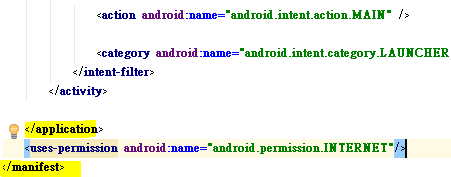
錯誤1:
java.net.socketexception socket failed eacces (permission denied)
是因為沒有加連線網路權限
<uses-permission android:name="android.permission.INTERNET"/>
錯誤2:
java.net.malformedurlexception:-no-protocol:
網址要有http://
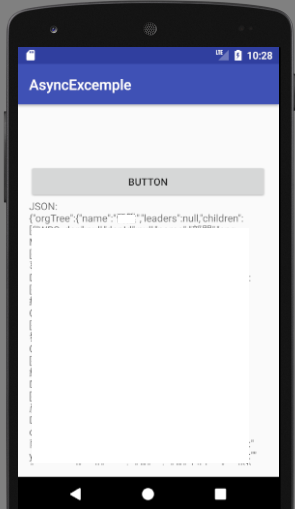
下載
參考資料:

請先 登入 以發表留言。